
Webhooks
In the cabinet: Bot settings → «Webhooks» block
Link: Open ↗
Webhooks let you drive an already-created Crazy bot’s deals from the outside — open, update, average and close positions on request. Handy for integrating with any third-party software, including strategies on TradingView.
Where to configure
Section titled “Where to configure”The Webhooks block is at the bottom of the bot form and becomes active once the bot is saved. Each action has its own tab — Open / Update / Average / Close — each with its own URL and ready-made request body.
The request body is built with a visual constructor: set the parameters via the form and the ready JSON updates on the fly, just copy it. Ghost webhooks have the same constructor.
Base URL shape:
POST https://api3.cryptorg.net/crazy/hook/{accountId}:{token}Content-Type: application/json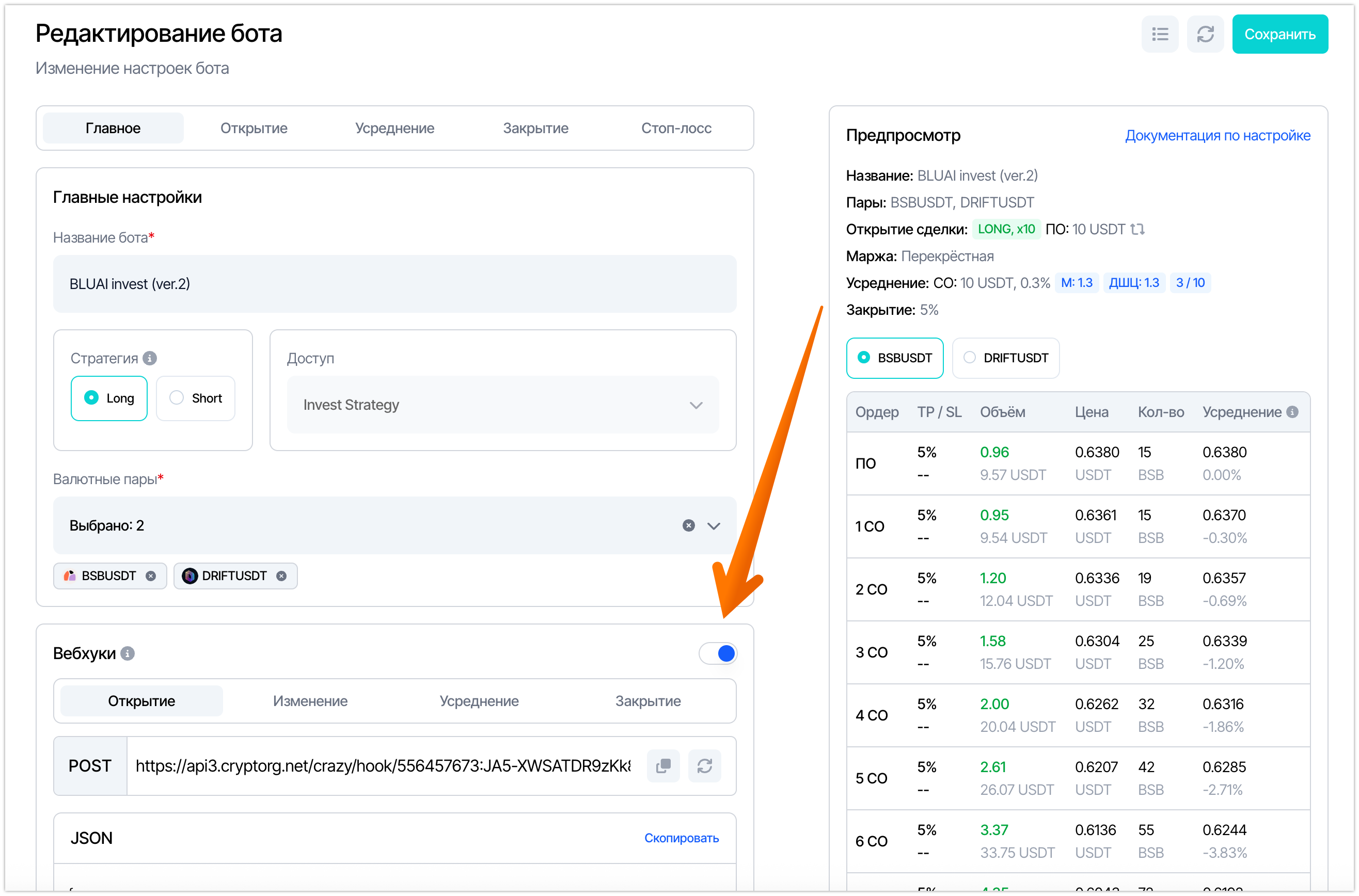
In every request the botId field is mandatory — it addresses the command to a specific bot. strategy and pairs set the deal’s direction and pairs.
A POST request with the full body: sections open (first order), dca (averaging), close (Take Profit) and stop (Stop-Loss).
Regular bot — botId field required, no action.
{ "botId": 180526, "strategy": "short", "pairs": ["SIRENUSDT"], "open": { "orderVolume": "15", "leverage": 10, "marginType": "cross", "orderType": "Market", "cycles": 33 }, "dca": { "enabled": true, "max": 10, "active": 3, "volume": "15", "percent": "0.3", "multiplierVolume": "1", "multiplierPrice": "1" }, "close": { "enabled": true, "event": "percentage", "value": "0.3" }, "stop": { "enabled": true, "event": "percentage", "value": "5", "delay": 3 }}Update
Section titled “Update”The same body as Open, but without the open section — the deal is already open. Updates the averaging grid (dca), Take Profit (close) and Stop-Loss (stop) of the active deal.
Regular bot — botId field required, no action.
{ "botId": 180526, "strategy": "short", "pairs": ["SIRENUSDT"], "dca": { "enabled": true, "max": 10, "active": 3, "volume": "15", "percent": "0.3", "multiplierVolume": "1", "multiplierPrice": "1" }, "close": { "enabled": true, "event": "percentage", "value": "0.3" }, "stop": { "enabled": true, "event": "percentage", "value": "5", "delay": 3 }}Average
Section titled “Average”Force-averaging is a POST request to a dedicated URL with the /topup-deal suffix. The body carries botId, direction, pairs and amount (averaging volume in USDT):
POST https://api3.cryptorg.net/crazy/hook/{accountId}:{token}/topup-dealRegular bot — botId field required, no action.
{ "botId": 180526, "strategy": "short", "pairs": ["SIRENUSDT"], "amount": "15"}closePosition: true closes the position; false cancels the deal while leaving the position open.
Regular bot — botId field required, no action.
{ "botId": 180526, "strategy": "short", "pairs": ["SIRENUSDT"], "closePosition": true}Parameter reference
Section titled “Parameter reference”-
botId— bot ID, mandatory. Addresses the command to a specific bot. -
strategy— direction:longorshort. -
pairs— list of trading pairs (["SIRENUSDT"]). -
opensection — opening parameters:orderVolume— first order volume in USDT (required);leverage— leverage;marginType— margin type:crossorisolated;orderType— order type:MarketorLimit;cycles— number of cycles.
-
dcasection (averaging) — disabled viaenabled: false:max— max safety orders,active— active at once;volume— safety order volume,percent— grid step in %;multiplierVolume/multiplierPrice— martingale by volume / by step.
-
closesection (Take Profit) —enabled,eventandvalue. The take-profit type (event) can vary, and it determines the meaning ofvalue:eventWhat valuemeanspercentageprofit percentage (%) pnlprofit in USDT delaytime (in seconds) -
stopsection (Stop-Loss) —enabled,event(percentageorpnl),valueanddelay— trigger delay in seconds. -
amount— on averaging only: averaging volume in USDT. -
closePosition— on close only:truecloses the position,falsecancels the deal without touching the position.
TradingView integration
Section titled “TradingView integration”- In the bot form, open the needed webhook tab → copy the URL and request body.
- In TradingView: Create Alert → Notifications → enable Webhook URL → paste the URL.
- Paste the JSON body into the Message field.
- Verify it fires — the deal appears in the bot’s deal list.