
Webhooks
In the cabinet: the “Spot bots” section, “My Bots”, bot settings, the “Webhooks” block at the bottom of any tab.
Webhooks control an existing bot from outside. One POST request opens a deal, changes the settings, buys more into the deal or closes it. TradingView and any service or script can send such a request.
How to turn them on
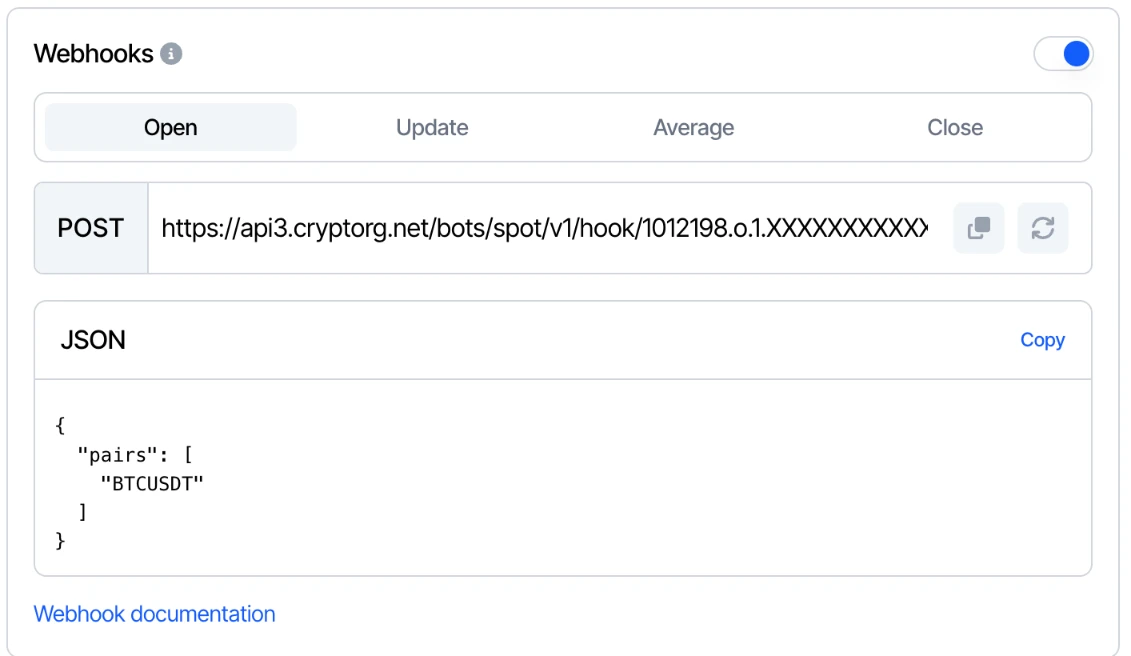
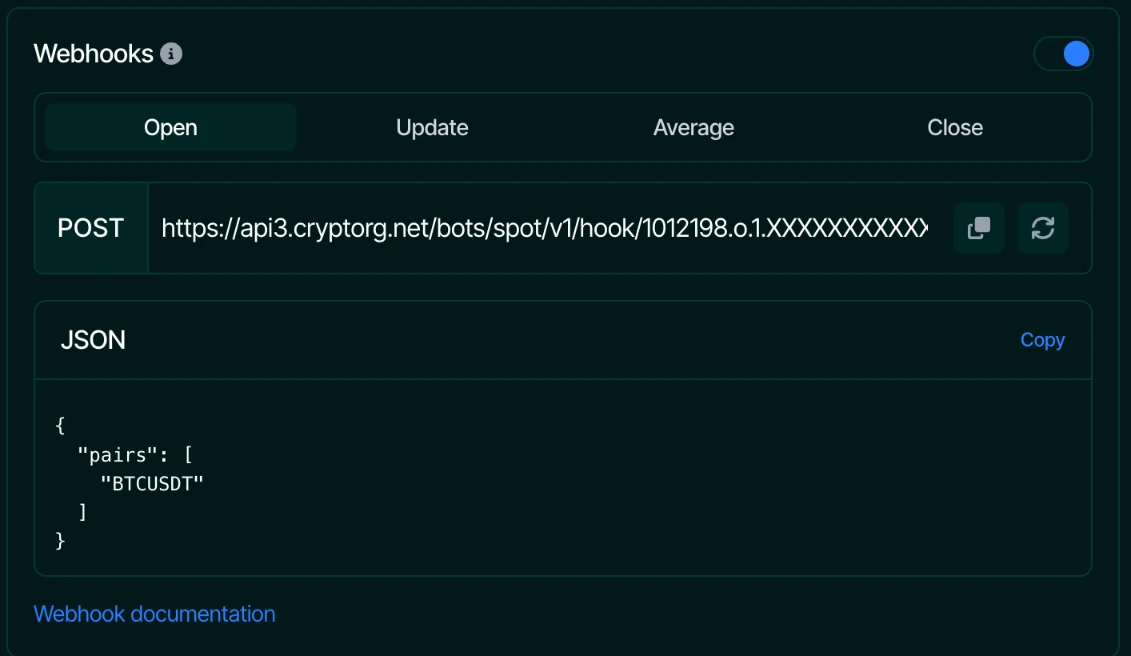
Section titled “How to turn them on”Webhooks are turned on with the “Webhooks” toggle in the bot settings; it is off by default. When it is on, the block shows four tabs, each with its own address and a sample request body:
| Tab | What it does |
|---|---|
| Open | opens a deal |
| Update | changes the bot settings |
| Average | buys more into an open deal |
| Close | closes or cancels a deal |
An address looks like this:
POST https://api3.cryptorg.net/bots/spot/v1/hook/<bot ID>.o.1.<signature>A new bot gets its addresses after the first save. You can turn the toggle
on and off at any time, including on a running bot. While it is off, a
request gets a 409 response and does nothing.
The whole address works as the key: it contains the bot number, the action
and a signature. No token, authorization or bot ID is needed in the body.
The Content-Type header can be anything; TradingView sends text/plain.
If the bot has not been saved for a long time and the “Open” or “Average” webhooks do not work, open its settings and click “Save” without changes. The bot is rebuilt with their support.
Server response
Section titled “Server response”An accepted request gets a 202 response right away:
{ "accepted": true, "action": "open", "bot_id": "1012198" }202 means the request was accepted. The action itself runs in the
background, and its result appears as a line on the “Logs” tab of the bot
page: what was done or why the action was not performed.
| Code | When |
|---|---|
202 | request accepted |
400 | invalid body: the averaging amount is not a number, the “Update” body is not a JSON object |
404 | the address is wrong, reissued, or the bot was deleted |
409 | the bot’s “Webhooks” toggle is off |
413 | body larger than 1 MB |
429 | too many requests to one address, try again later |
503 | webhooks are temporarily unavailable |
In all actions with the pairs field, a pair can be written as BTCUSDT,
btcusdt or BTC/USDT. Without pairs, the action applies to all pairs
of the bot.
Opens a deal on the bot’s pairs that have no deal right now.
{ "pairs": ["BTCUSDT"]}The body can be empty; then a deal opens on all pairs of the bot.
- The webhook works only for a running bot with the “By signal” entry condition. A bot with “Continuous” entry opens deals by itself, and a bot with opening turned off does not open deals by webhook either.
- The deal opens with the bot settings. To open it with other parameters, change them first with the “Update” webhook.
- A pair that already has a deal is skipped. A repeated request while the first order has not filled yet does not open a second deal.
- The delay before opening a deal is respected: a request during the pause after the pair’s previous deal is skipped.
- With the price restriction on, the deal opens only if the pair’s price is within the allowed range.
Update
Section titled “Update”Changes the bot settings the same way as the edit form. The request body is a JSON object with only the fields you want to change. The “Update” tab shows all current bot settings in this format.
{ "entry": { "volume_quote": "150", "open_delays": { "BTCUSDT": 120, "ETHUSDT": 300 } }, "dca": { "safety_orders": 5, "active_safety_orders": 3, "step_pct": "1.5", "volume_quote": "100", "martingale_enabled": true, "martingale": "1.2" }, "exit": { "take_profit_pct": "2.5" }, "stop_loss": { "enabled": true, "pct": "8", "delay_sec": 30 }}- Nested objects are merged:
{"exit": {"take_profit_pct": "2.5"}}changes only the take profit, and the otherexitfields stay as they were. Lists (symbols,signal_ids) are replaced as a whole. - A pair without an open deal switches to the new settings at once. A pair with a deal finishes it with the old settings and uses the new ones from the next deal.
- An added pair (
symbols) starts by itself. A pair with an open deal cannot be removed until the deal closes. - The same checks as in the form apply. If a value is not allowed, for example a delay over 500 seconds or changing the exchange of a running bot, the settings do not change, and the reason appears on the “Logs” tab.
- This webhook cannot start, stop or pause the bot.
Average
Section titled “Average”Buys more into the open deal at market for the given amount in USDT, like
all bot amounts. On a pair with another quote currency, such as ETH/BTC,
the amount is converted at the current exchange rate.
{ "pairs": ["BTCUSDT"], "amount": "50"}The body can be shortened to a single number:
50This is the same as {"amount": "50"} without pairs: the bot buys for
50 USDT on every pair that has an open deal. This is handy for the Message
field of a TradingView alert.
- The buy runs on every working pair of the bot that has an open deal. Pairs without a deal buy nothing.
- What is bought goes into the deal’s average price, and the take profit is moved.
amountis greater than 0, up to 18 digits after the point, without an exponent. It can be a string ("50") or a number (50).- The amount is limited by the money on the account and by “Investment per cycle”, if set: a buy that would take the deal over it is not made. If there was not enough money, the reason appears on the “Logs” tab.
Closes the bot’s open deals.
{ "pairs": ["BTCUSDT"], "close_position": true}close_position: true(an empty body works the same) closes the deal: the bot removes its orders and sells the deal’s coins at market (Short buys them back).close_position: falsecancels the deal: the bot removes its orders, and the coins stay on the account and no longer count as the bot’s deal.- The bot does not stop after closing. If it opens deals continuously, the pair opens the next deal as usual.
- A repeated request is safe: the second time there are no open deals.
Parameter reference
Section titled “Parameter reference”| Parameter | Where | Description |
|---|---|---|
pairs | open, average, close | list of pairs, for example ["BTCUSDT"]; without it the action applies to all pairs of the bot |
amount | average | buy amount in USDT, a string or a number greater than 0 |
close_position | close | true closes at market (default), false cancels the deal, the coins stay on the account |
| whole body | update | a JSON object with the bot fields to change |
Fields the “Update” webhook changes:
| Field | What it is | Values |
|---|---|---|
name | bot name | up to 128 characters |
symbols | bot pairs | a list of up to 10 pairs, replaced as a whole; quote currencies may differ |
entry.enabled | opening deals by the bot | true or false |
entry.condition | entry condition | immediate (continuous), signal (by signal) |
entry.signal_ids | entry signals | up to 100, the list is replaced as a whole |
entry.market_shock.* | entry by Market shock | enabled, impulse_type (pump or dump), speed (shock or slow), min_power from 0 to 1000 |
entry.order_type | first order type | market or limit |
entry.limit_price, entry.limit_prices.<PAIR> | price of a limit first order | a number as a string, greater than 0, in the quote currency |
entry.volume_quote | first order volume | a number as a string, greater than 0, in USDT |
entry.open_delays.<PAIR> | delay before opening a deal | from 0 to 500 seconds, 0 for no pause |
entry.price_limit_enabled, entry.price_limits.<PAIR>.min_price, max_price | price restriction | a number as a string; an empty bound or 0 means no restriction on that side |
entry.active_deals_limit_enabled, entry.active_deals_limit | limit on simultaneously open deals | an integer greater than 0 |
entry.deals_volume_limit_enabled, entry.deals_volume_limit | limit on total volume of open deals | a number as a string, greater than 0, in USDT |
entry.advanced.max_active_orders | how many orders the bot keeps on the exchange at once | from 1 to 50 |
entry.advanced.max_quote_exposure | ”Investment per cycle” | a number as a string, greater than 0, in USDT; without the field there is no limit |
dca.enabled | averaging | true or false |
dca.safety_orders | number of safety orders | from 1 to 100 |
dca.active_safety_orders | how many SO are on the exchange at once | from 1 to 50 |
dca.step_pct | SO step, % | a number as a string, greater than 0 |
dca.volume_quote | SO volume | a number as a string, greater than 0, in USDT |
dca.martingale_enabled, dca.martingale | SO volume multiplier | from 1 to 3 |
dca.dynamic_step_enabled, dca.dynamic_step | SO step multiplier | from 0.5 to 3 |
dca.so_regrid | re-grid count | from 0 to 10 |
exit.enabled | closing by the bot | true or false |
exit.mode | how the bot closes | take_profit, pnl or time |
exit.take_profit_pct | take profit, % | a number as a string, greater than 0 |
exit.pnl | closing by profit | an amount in USDT after fees |
exit.time | closing by time | from 1 to 31,536,000 seconds |
exit.signal_enabled | closing by signal | true or false, false by default |
exit.signal_ids | exit signals | up to 100, the list is replaced as a whole |
exit.loop_enabled | repeat deals | true or false |
exit.max_cycles | limit on completed deals | from 0 to 100, 0 for no limit |
stop_loss.enabled | stop loss | true or false |
stop_loss.mode | stop loss option | percentage or pnl (loss amount) |
stop_loss.pct, stop_loss.pnl | stop loss level | a percentage greater than 0 or an amount in USDT |
stop_loss.delay_sec | stop loss delay | from 0 to 100 seconds, 0 for no delay |
stop_loss.close_bot | stop the pair after a stop loss | true or false |
Numbers with a fractional part (amounts, prices, percentages) are sent as
strings, for example "1.5". All amounts (volume_quote,
deals_volume_limit, pnl, amount) are in USDT, and prices are in the
pair’s quote currency.
TradingView integration
Section titled “TradingView integration”- In the bot settings, open the “Webhooks” block, the tab you need, and copy the address.
- In TradingView, open Create Alert, then Notifications, turn on Webhook URL and paste the address.
- Put the request body into the Message field. To open a deal on the
chart’s pair:
{"pairs": ["{{ticker}}"]}. To average for 50 USDT:50. To close all deals of the bot, leave the field empty or write{}. - When the alert fires, a line about the received webhook appears on the “Logs” tab of the bot page.
TradingView fills in {{ticker}} as the pair name without the exchange;
on a Binance chart it is BTCUSDT.